
CREATE & SAVE PROJECTS
After configuring a song in the PROJECT MIXER, you have the option to save it as a project. These projects serve as a convenient way to store your songs for future use. You can add these projects to MY RECORD, allowing you to access and use them at any time. Additionally, you can add them to playlists for different occasions or share links with others, enabling them to enjoy your music.
*Tracks in SOUND SEPERATE will also be saved as projects, but please note that these projects are intended for personal use only and cannot be shared with others.
COMPOSIT TRACKS & SAVE

You can quickly find the tabs by using the SEARCH BOX in the top right corner of PROJECT MIXER. Alternatively, you can directly search on the TABS LIBRARY page, where you can access all the available data.


You can use the ADD TRACK feature to incorporate tracks from other members or utilize RECORD to record your own track and add it to the MIXER. You also have the option to adjust the volume and stereo channels for each track. Once you've configured your project to your satisfaction, you can simply click SAVE PROJECTS.
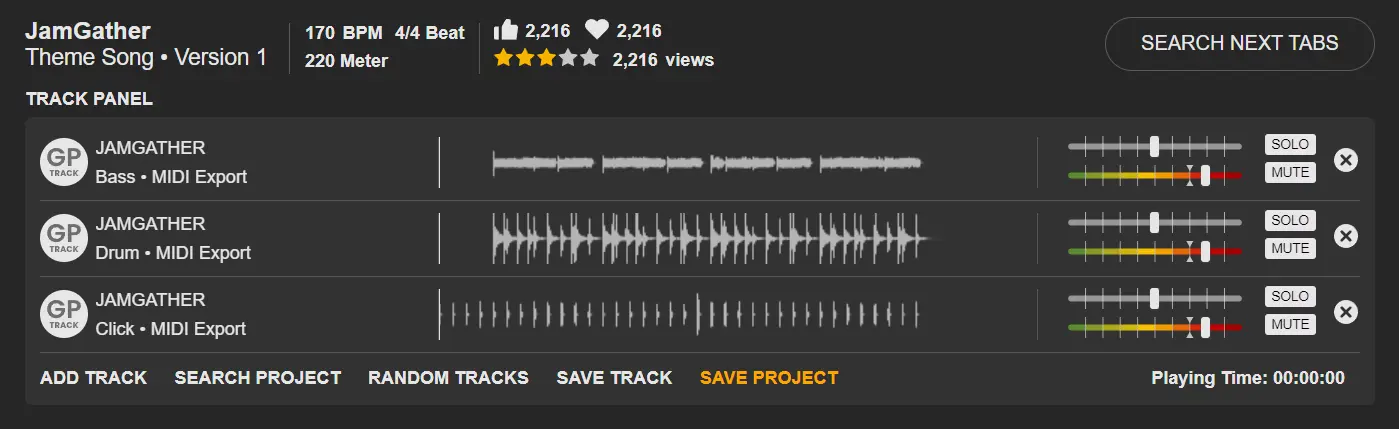
**If there are enough member-recorded tracks for a song, the ultimate goal is to replace the MIDI tracks and keep only the click track. However, you are free to do anything you like!

You can add notes in the PROJECT DESCRIPTION to make it easier for other members. These notes can indicate your version, such as Rock Ver / Blues Ver, / Simple Ver....etc, or any label you prefer.
In terms of permissions, please note that you can set them for personal or public use. If you choose 'personal use', other members won't be able to see it. Once you've finished, you can press the SAVE NEW button, then you can find the projects save in MY RECORD > PROJECTS section.
In terms of permissions, please note that you can set them for personal or public use. If you choose 'personal use', other members won't be able to see it. Once you've finished, you can press the SAVE NEW button, then you can find the projects save in MY RECORD > PROJECTS section.

LAST UPDATE: 2026-02-06